RangerMSP Web Interface
RangerMSP Web Interface enhances the power of RangerMSP by extending its reach to remote users or satellite offices anywhere via the Internet.
click to enlarge
RangerMSP Web Interface is an Internet/Intranet-based application employing the latest technologies that enable your employees and customers to access data in RangerMSP through a standard Web browser.
IT professionals may spend most of their time out of the office. Typically, you work at client sites and from home, and need to keep up to date with your schedules, assigned tickets and tasks, customer information and more. This is where RangerMSP Web Interface comes in to play.
RangerMSP Web Interface comes as two modules:
RangerMSP Web Interface for Employees
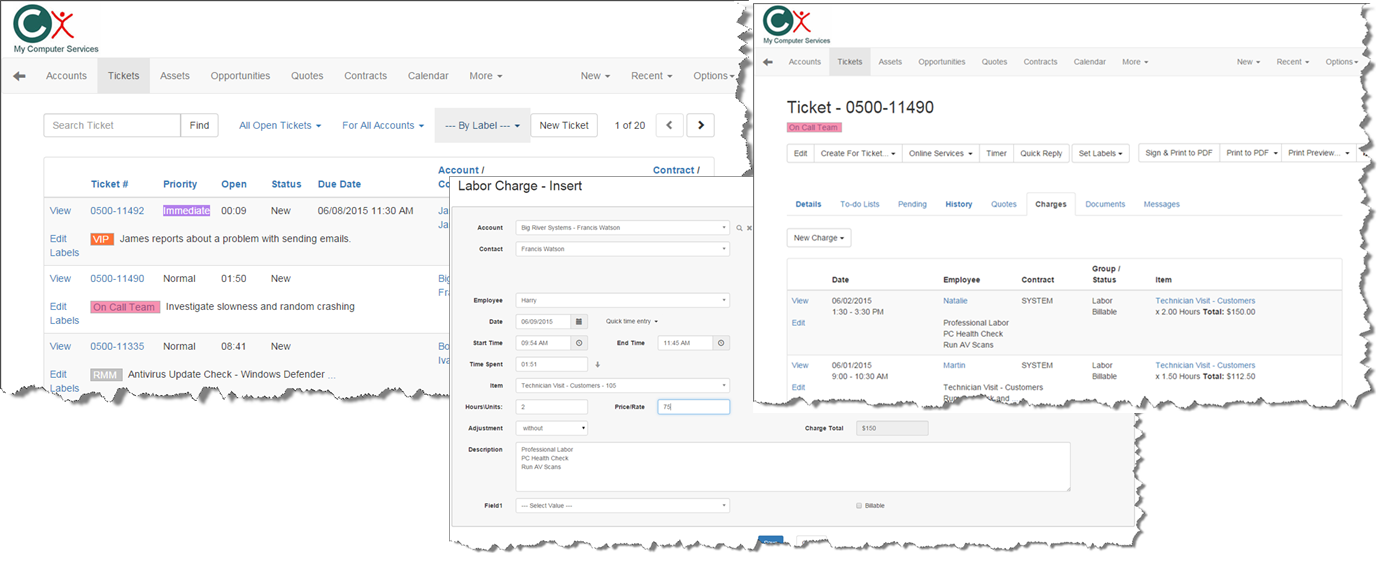
This module enables employees to access RangerMSP data remotely using a Web browser and their Web username/password. They can then manage (view/add/edit) various types of information in RangerMSP including: Accounts, Tickets, Appointments, Tasks, Charges (Labor, Parts and Expenses), Assets and History Notes. They can also view other information including Items, Contracts, Sales Opportunities, and more.
Web users can be defined for all Active Employee records in RangerMSP, and permission to use the Web interface can be granted or denied to certain employees.
click to enlarge
Customer Web Portal
This module enables the creation of unlimited customer Web users (multiple users can even be defined for each customer/account). Using a browser, your customers will be able to login to RangerMSP remotely and view data which is relevant to them, including open Tickets, closed Tickets and scheduled technician visits. Customers can also log new tickets which will automatically receive a ticket number and enter the Received Tickets queue in RangerMSP.
You can receive email alerts whenever a customer creates a new ticket, or updates an old one, via the Customer Web Portal.
Customer Web Portal is a simple, clear and easy to understand interface. Your staff and customers will quickly feel comfortable with the program with a minimum of training.
More…
From a technical perspective, RangerMSP Web Interface runs on your server as a Windows service and serves incoming requests from employees or customers who are logged in. For maximum security, you can configure Microsoft IIS as the back end for the Web interface and use your SSL certificates so that encrypted Https: connections will be used.
RangerMSP Web Interface’s look is customizable. With a few HTML changes to the basic settings, you can customize the interface to display your company name, logo and contact information on every page.
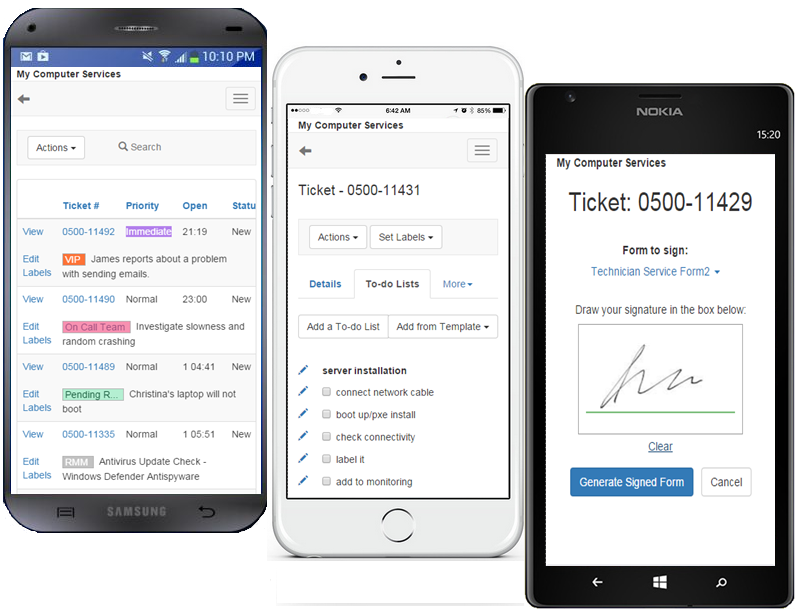
RangerMSP Web Interface is Responsive and is optimized for mobile devices including phones and tablets/iPad. The mobile display allows you to easily view and manage tickets, get customer contact details, log time and parts charges and much more directly from your phone.
By using RangerMSP Web Interface you will:
-
Increase efficiency by letting remote technicians manage their assigned tickets, schedules and tasks, add new charges for labor and parts, capture customer signature on tickets, view customer information, and much more
-
Save costs by reducing the number of customer “status” phone calls since they can view their status and log new tickets online
-
Improve your service by providing online data to customers 24/7/365
-
Increase customer satisfaction!


Frequently Asked Questions
Can I use RangerMSP Web Interface if my company’s Web site is hosted?
Yes. You need to upload the login page to the hosted server; when a user logs in via your Web site, a connection to your company’s server containing the RangerMSP Web Interface and RangerMSP will be established. This process is transparent to the user.
Can I use the RangerMSP Web Interface with a firewall?
Yes. You need to set up the firewall to allow traffic through the port used by RangerMSP Web Interface (configurable).
Can I use SSL certificates to secure connections?
Yes, if you have valid SSL certificates you can easily set RangerMSP Web Interface to use them by configuring Microsoft IIS as the back end for the Web interface. This will let you use encrypted (https) connections rather than the standard http ones.
Can I use RangerMSP Web Interface from my Apple Mac computer, iPad and iPhone?
Yes, Apple® Mac®,iPad and iPhone users can access and manage RangerMSP data on their devices using the modern Web browsers including Safari.
Can I display my company’s logo, name and contact information on the Web pages?
Yes, you can add a header and footer for all pages generated by RangerMSP Web Interface. The header and footer can be designed using standard HTML.
What information do customers see?
Customers see only information relevant to them, such as their open and closed Tickets and scheduled visits by technicians to their site. Customers can also optionally view contract information, charges, assets, Knowledge Base articles, download files and more.
Is there a limit to the number of customers who can log in to the application?
No. There is no limit to the number of customers who can log into the application when using Customer Web Portal. This may be limited only by the available resources on the Web server.
Is there a limit to the number of technicians/employees who can log into the application?
Yes, the number of technicians/employees is limited by the number of Active Employee licenses you have.
Can I create more than one Web user for a customer?
Yes, you can add as many Web users as you need for each of your customers (accounts). Each will have their own username and password.
Are there different versions/modules available?
Yes, two modules are available: RangerMSP Web Interface for Employees and Customer Web Portal. You can use one or both of these modules.
Can I try it?
Yes, RangerMSP trial includes the Web interface modules for you to test and use. Follow the instructions in the RangerMSP Web Interface guide (found here) to use it.